For the past 40 years, software interfaces have balanced between simplicity and functionality, targeting either novice users with basic needs or power users seeking advanced features. This has resulted in a 'Zone of Infeasibility'—an area where it seems impossible for high functionality to meet user-friendly design.
Though much of the buzz around Generative AI centers on its potential to surpass human intelligence, its true marvel is that it has bridged the gap between high functionality and user-friendly design, an area long considered unreachable. This breakthrough now allows both novice and power users to benefit from an intuitive interface that was once thought impossible.
This post covers how Generative AI is reshaping the landscape of user experience (UX) design and what it means for the future of software interfaces.
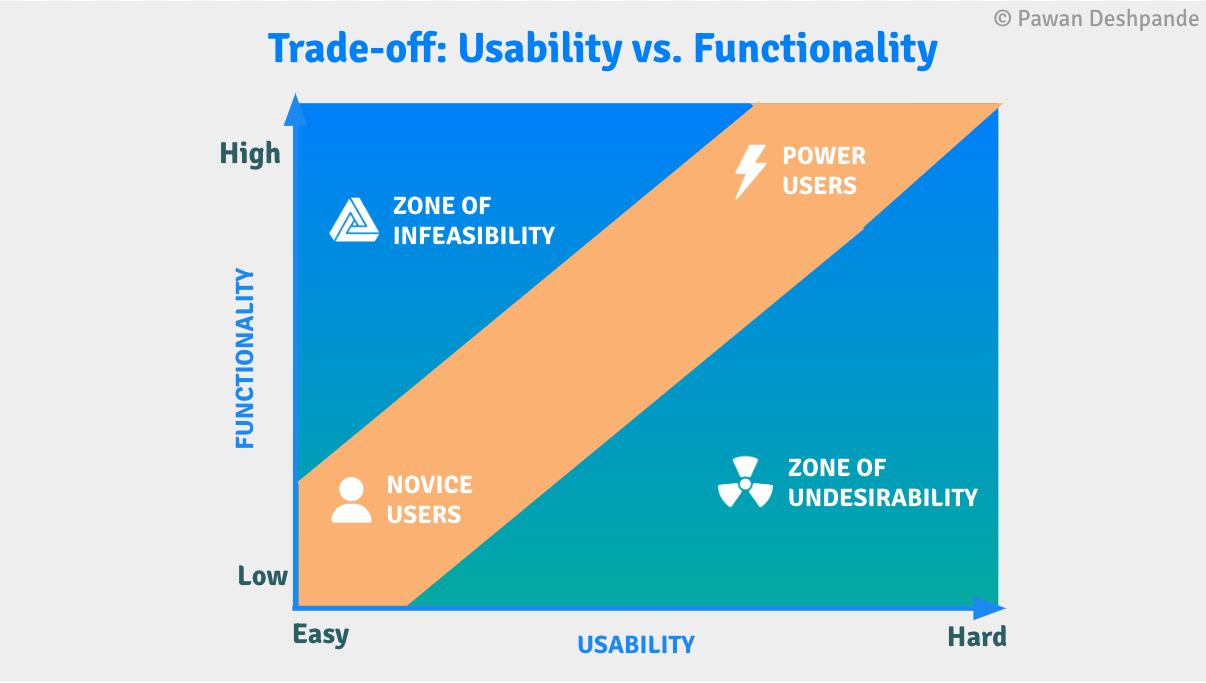
Plotted as shown above, product designers have been relegated to creating interfaces that traverse the thin band in the middle whereby ease-of-use is inversely correlated with product functionality.
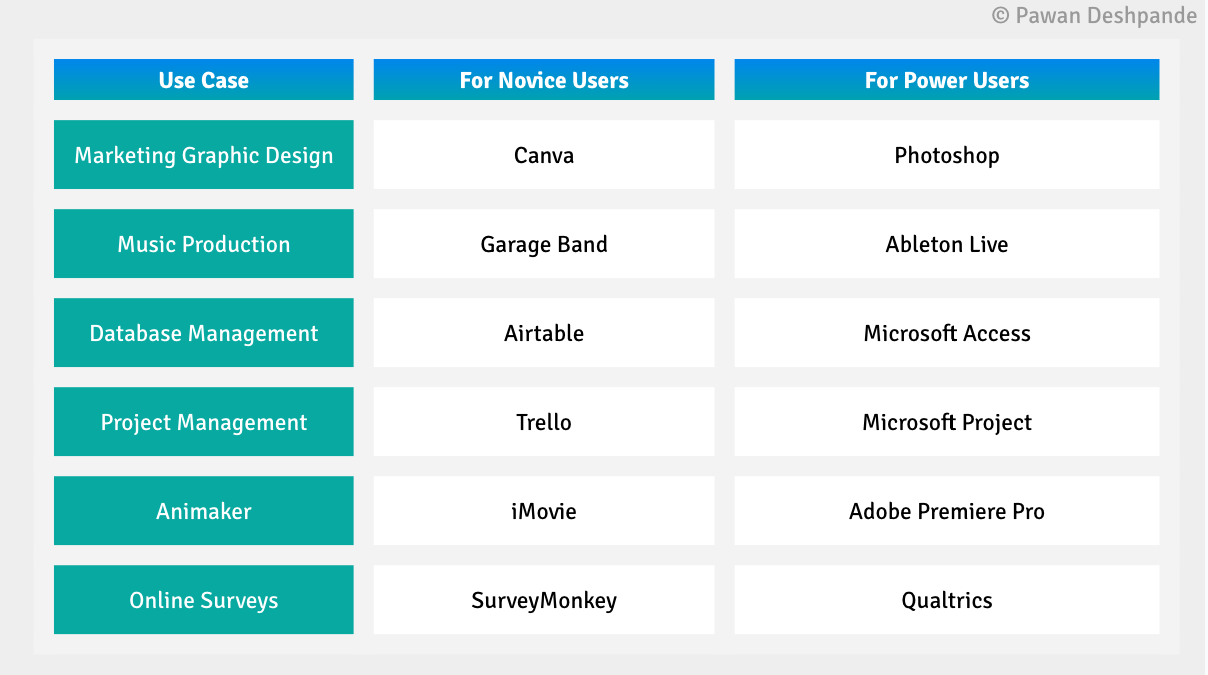
To illustrate this further, above are examples of low-functionality but easier-to-use software for novice users along with their high-functionality but harder-to-use software for power users counterparts.
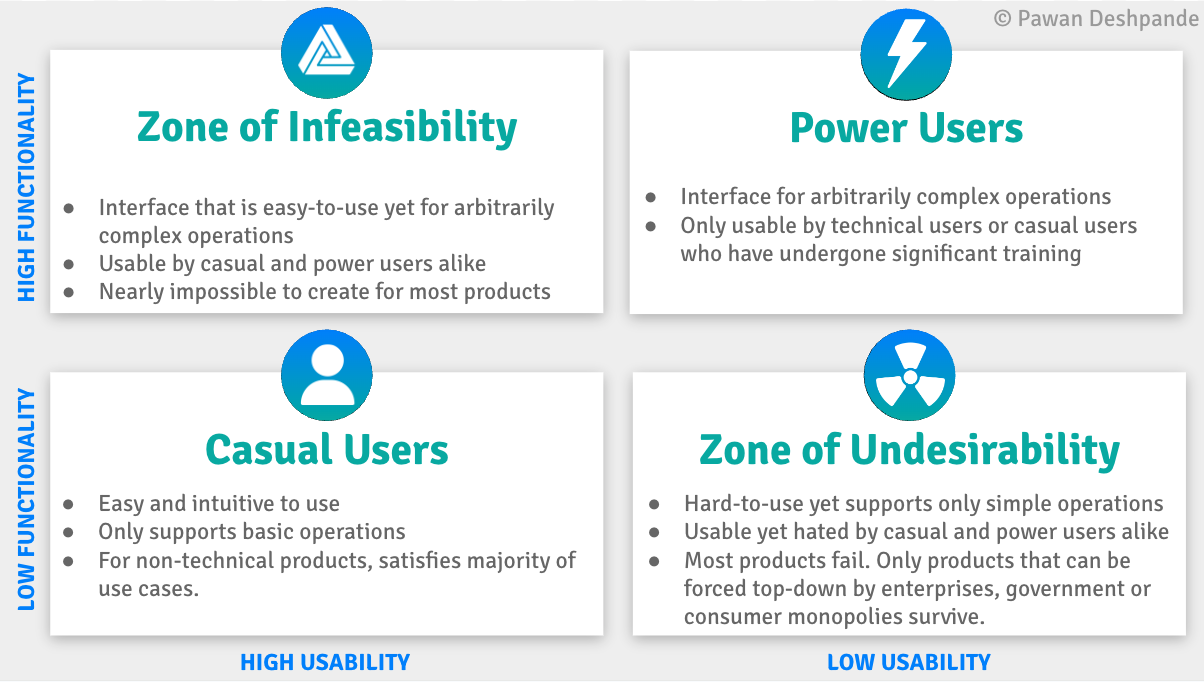
Visualized in quadrants, we can observe that there are four distinct zones:
- Novice User Zone contains products that are easy and intuitive to use, and only support basic operations. For products that serve non-technical users, interfaces in this zone satisfy the majority of use cases.
- Power User Zone contains products which have harder-to-user interfaces for arbitrarily complex operations. These interfaces often include non-graphical elements, such as APIs. These products are only usable by technical users, or novice users who have undergone significant training in order to use the power user interface. An example of this would be a marketing user who has learned SQL in order to perform analysis on customer data.
- Zone of Infeasibility contains products which have interfaces that are easy-to-use yet support arbitrarily complex operations. These interfaces are usable by novice and power users alike. In reality, it's traditionally been nearly impossible to create these interfaces for most products.
Zone of Undesirability contains products that are hard-to-use yet support only simple operations. These products are not market viable and usually fail to gain adoption. However, they do exist where they can be imposed and mandated by top-down authorities such as internal apps used by enterprises, applications for government services, or consumer apps where there is a monopoly without other alternatives. Products that survive in this zone are hated by users.
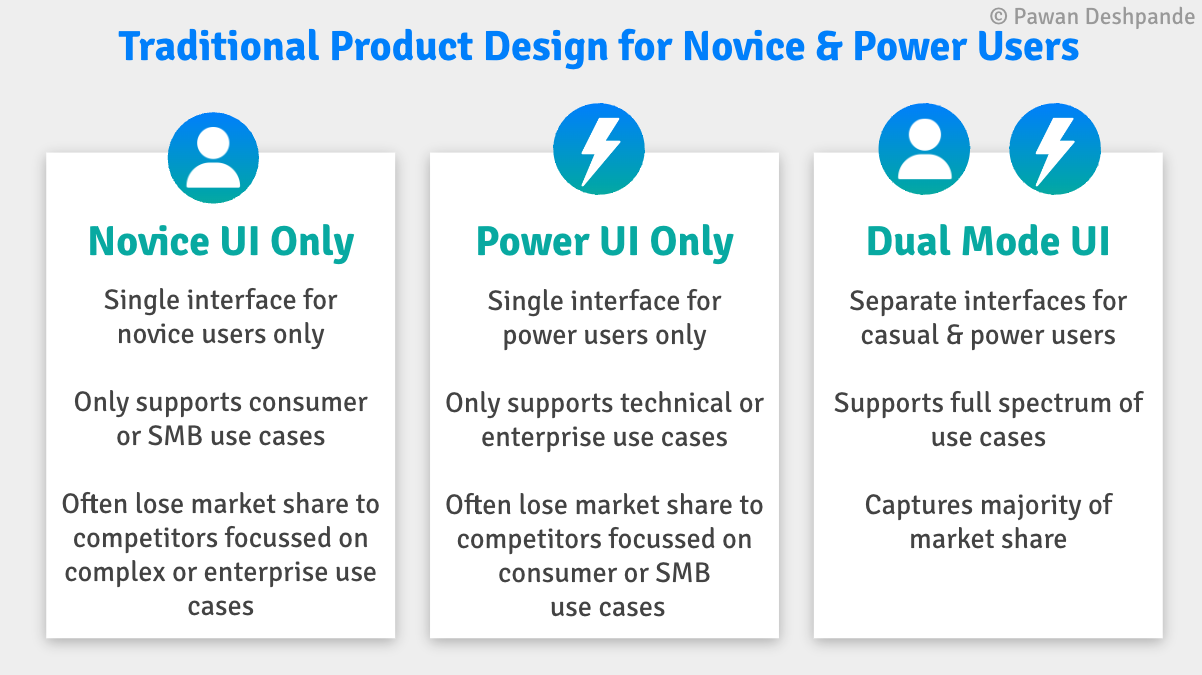
In the pre-generative AI era, products designed along this band fall into one of the following three categories:
- Novice UI Only. Some products support only a single interface for novice users, typically for consumer or SMB use cases. Such products often lose market share to competitors focussed on related complex or enterprise use cases.
- Power UI Only. On the other hand, some products only support a single interface for power users only, typically for technical or enterprise use cases. Such products end up losing market share to competitors focussed on related consumer or SMB use cases.
- Dual Mode UI. Other companies build products with a dual mode UI with separate interfaces for novice and power users within the same product that support a full spectrum of uses cases. Such products are often able to capture a majority of market share across market segments. Sometimes companies will have a dual mode UI but across products, where they have different editions of the same product for different market segments, enabling them to price discriminate more effectively.
Next, we will cover a few examples of companies with interfaces in each of the above three categories.
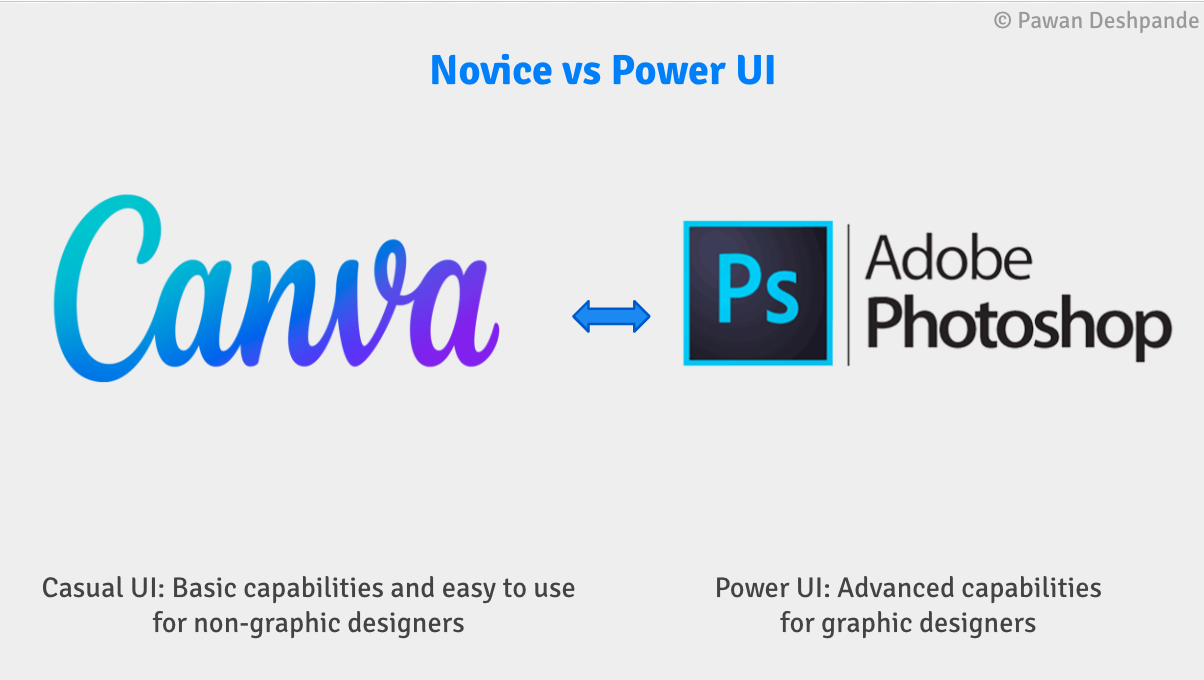
Our first example is for graphic design, where Adobe has $12B in revenue for Photoshop which caters to power users such as graphic designers. However, this exclusive focus on power users left a hole in the market for Canva to capture market share and build a $1B a year revenue business for graphic design software catering to novice users such as marketing teams, and small businesses.
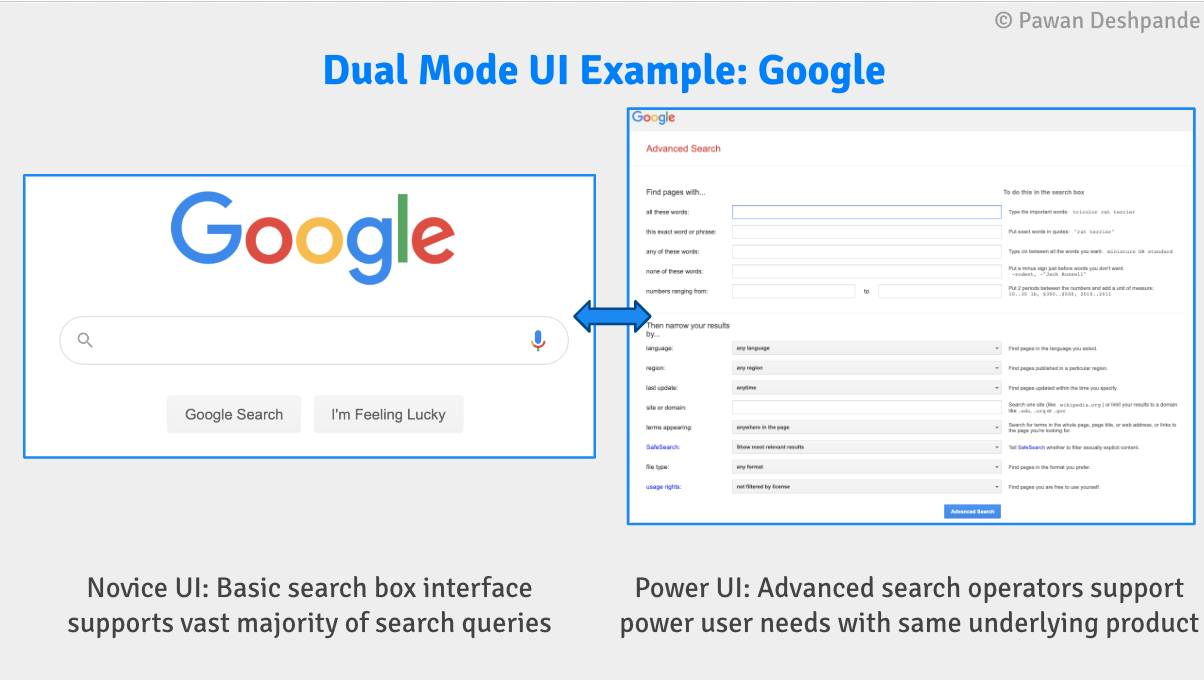
Another example of two interfaces for the same product is Google's core search product where their simple search box interface likely serves 99% of their their search volume for novice users, whereas their advanced search interface and advanced search operators in their simple search box serve the 1% power users.
Google's search product exemplifies a Dual Mode UI. For novice users, a basic search box handles the majority of queries, while advanced search operators cater to power users. By offering both a novice UI and a Power UI, Google is able to cater to a wide range of users and their varying needs, capturing a significant market share across different user segments.
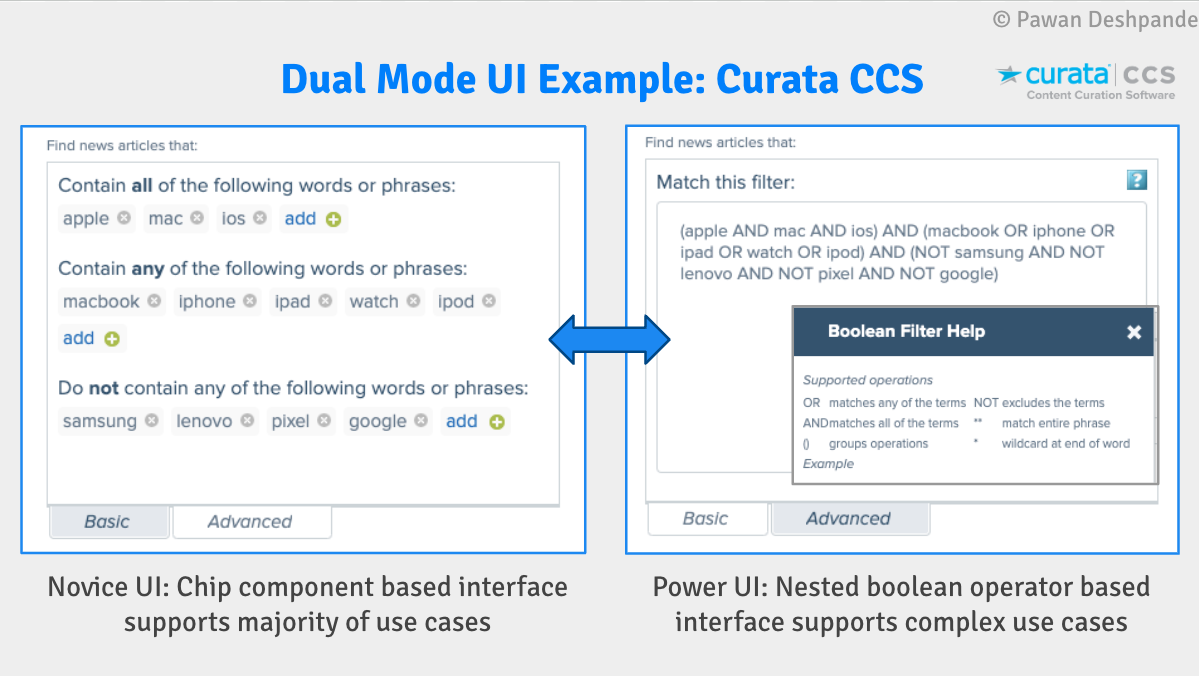
The next example is from a product from my own startup called Curata Content Curation Software (CCS) used to discover news and blog content. Here we offered a chip component based UI for novice users, and an advanced UI for power users that supported a full array of boolean operations including nested precedence operators.
How novice users traditionally get power functionality
Novice users traditionally get access to power functionality by one of two ways:
Method 1: Upskilling where novice users learn how to use power functionality. For example, a business user, who wants to run powerful analytics queries that are above and beyond what is possible to run through a graphical report builder interface, may learn SQL to run queries on their own.
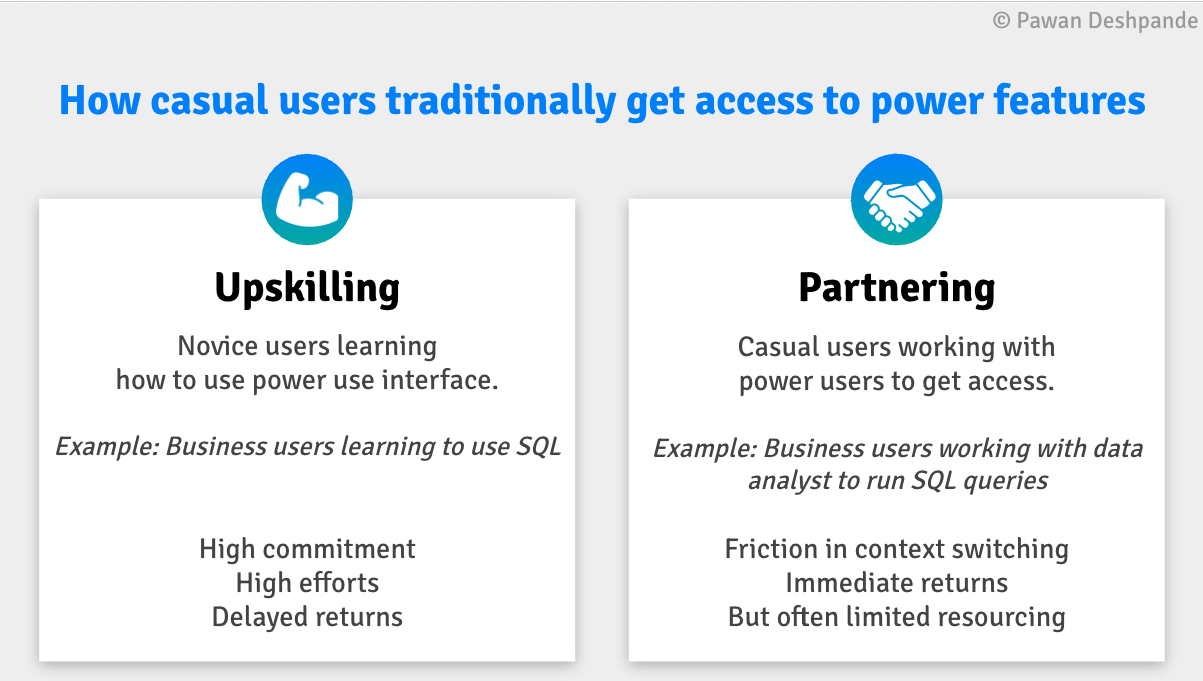
Upskilling requires significant effort and time on behalf of the business user. And while the benefits of upskilling are permanent, it often is unattainable for non-technical users.
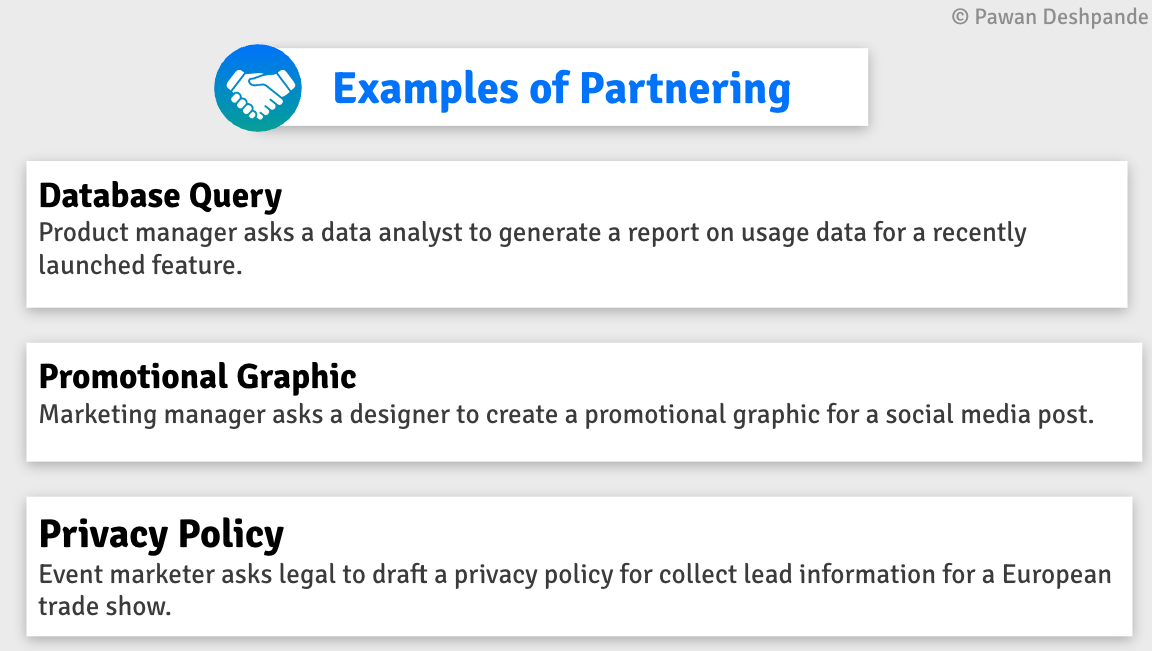
Method 2: Partnering where novice users partner with power users to operate power functionality on their behalf. Examples of partnering include:
- Database Query: Product manager asks a data analyst to generate a report on usage data for a recently launched feature.
- Promotional Graphic: Marketing manager asks a designer to create a promotional graphic for a social media post.
- Privacy Policy: Event marketer asks legal to draft a privacy policy for collect lead information for a European trade show.
For example, a business user may ask a data analyst, to execute a SQL query and return the results for them, or a marketing user may ask a graph designer to design something for them, or a UX designer may ask a front-end engineer to implement a UX they have designed.
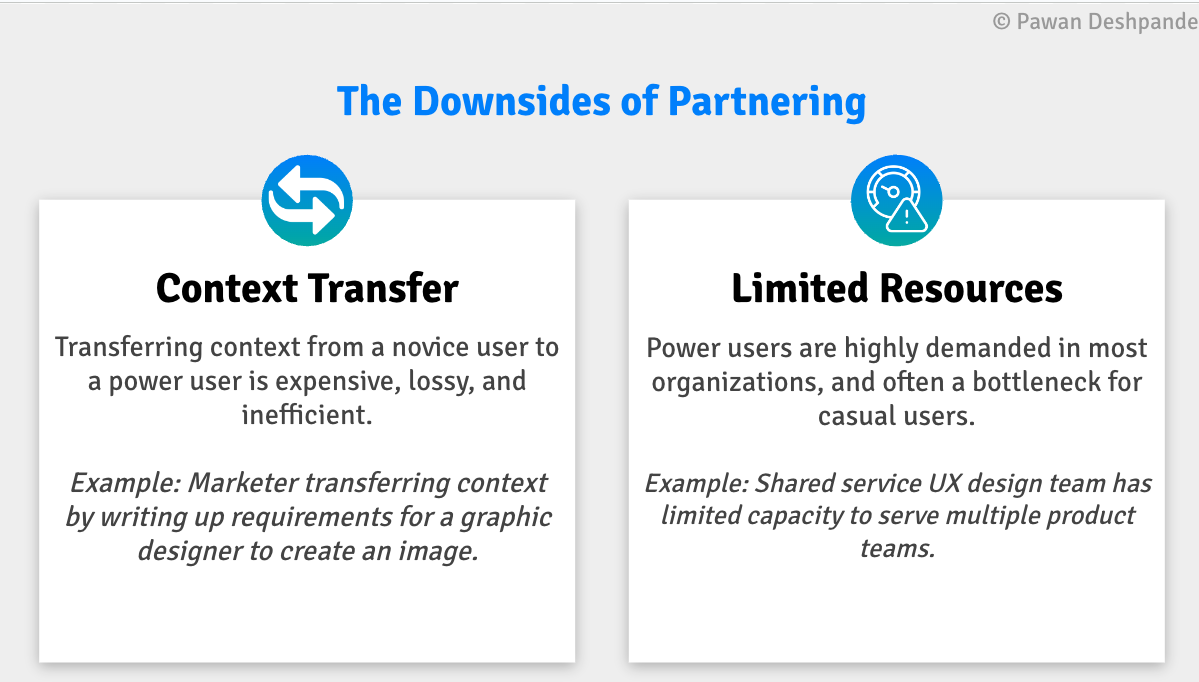
Partnering essentially gives the novice user unlimited capabilities, but there are two common downsides:
- Context Transfer. Working with a power user involves the transfer of a lot of context, which is expensive, often lossy, and inefficient. For example a marketing user, may need to write up a page of requirements in order for a designer to create something for them.
- Limited Resources. Power users are often sought after specialists, and therefore are limited in capacity and availability, which often becomes a bottleneck for novice users. For example, a shared service UX design team has limited capacity to serve multiple product teams
How Generative AI Unlocks the Zone of Infeasibility
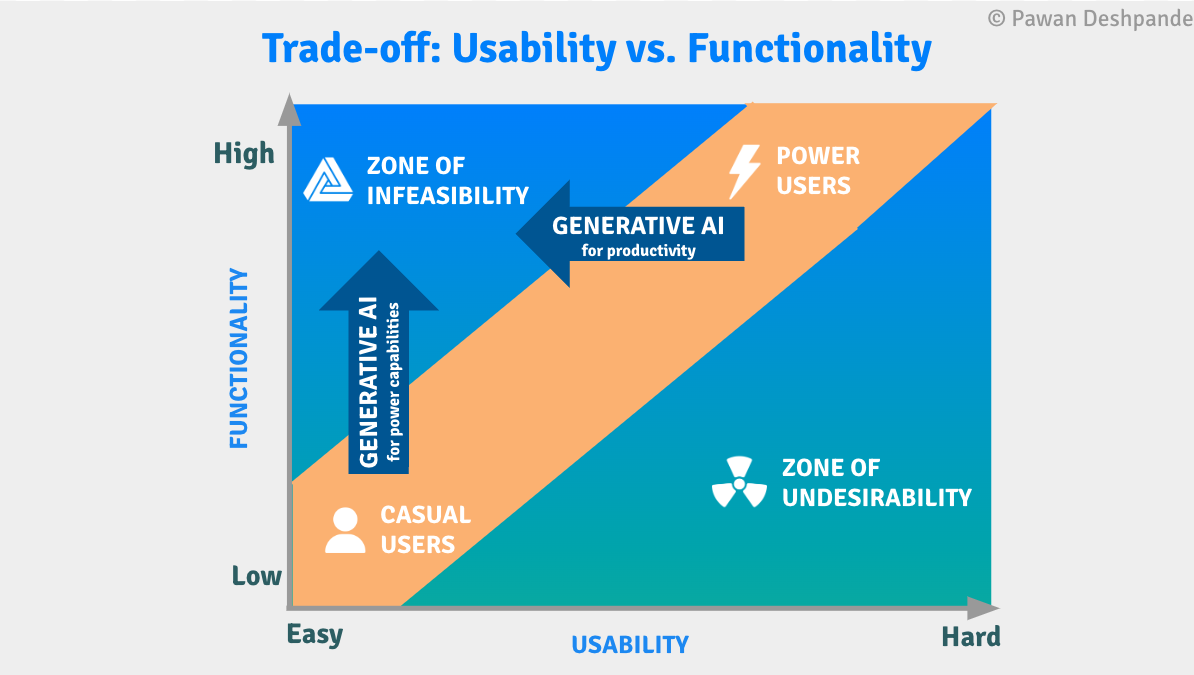
Generative AI interfaces completely change this paradigm by unlocking the Zone of Infeasibility for both novice users and power users.
While these two shifts converge on the same point in the diagram above, they are actually two distinct classes of generative AI tools that we will explore further next.
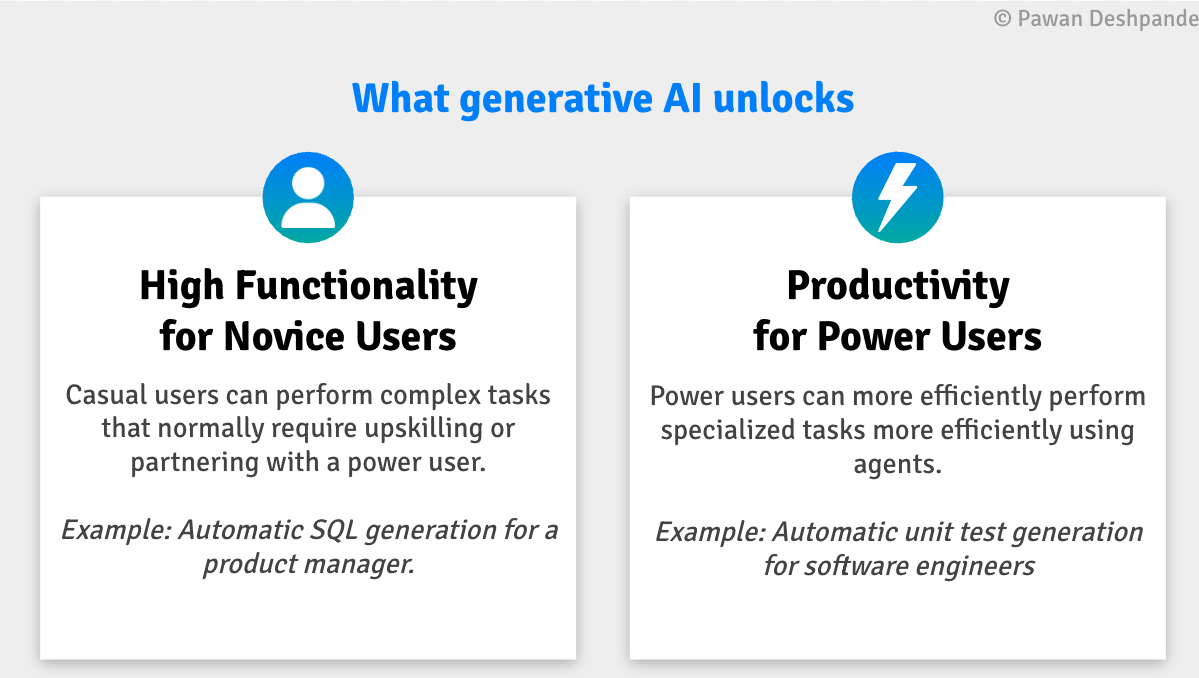
High Functionality for Novice Users: The first class of generative AI capabilities are those that unlock high functionality capabilities for novice users within an easy to use interface, that would be otherwise impossible for them to use without up-skilling or partnering.
A few examples below are:
- Poetry Generation. Whereas previously a novice user would need to partner with someone with poetry talent, or upskill by learning how to compose poetry, ChatGPT enables a novice user to write poetry themselves.
- Image Modification (Inpainting). Whereas previously a novice user would need to partner with a graphic designer to modify a photo, or upskill by learning how to do this, Adobe Photoshop's Generative Fill enabling a novice user to modify complex photorealistic scenes.
Convenience & Efficiency for Power Users. The second class of generative AI capabilities are those that enable power users to do things that they normally do on their own, but more efficiently with generative AI. These are typically referred to as co-pilots or agents.
A well-known example here is:
- Copilots. Copilots (such GitHub co-pilot) are designed exclusively for power users to increase their efficiency on otherwise rote tasks that they could complete on their own accord.
Case Study: Virtual Staging AI
One of my favorite examples of breaking into the Zone of Infeasibility is a startup called Virtual Staging AI.
Traditionally to create enticing photos for a property listing, realtors had to (1) rent expensive staging furniture for properties, and conduct a photoshoot, or (2) pay an agency like Box Brownie $25 per shot to photoshop in furniture with additional fees for other enhancements.
Virtual Staging AI upended this by training a generative AI model that could remove and add furniture for a few cents of inference cost while preserving fixtures in the room.
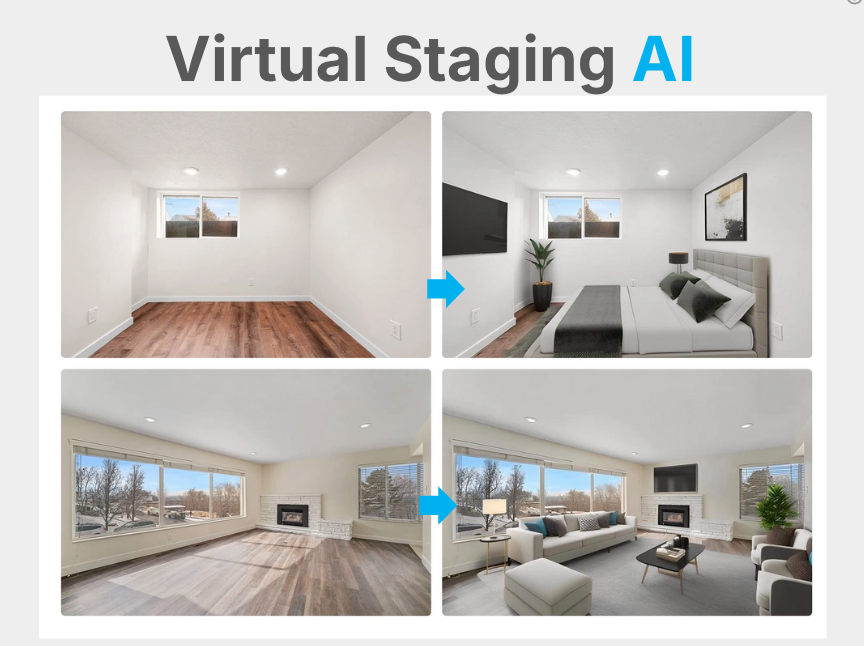
Virtual Staging AI broke into the Zone of Infeasibility by enabling realtors to easily do what they previously had to partner with designers for, at a fraction of the cost. As a result, Virtual Staging AI went from inception to $1M ARR in just 10 months and eventually exited to Zillow.
Generative AI: Mostly a UX shift
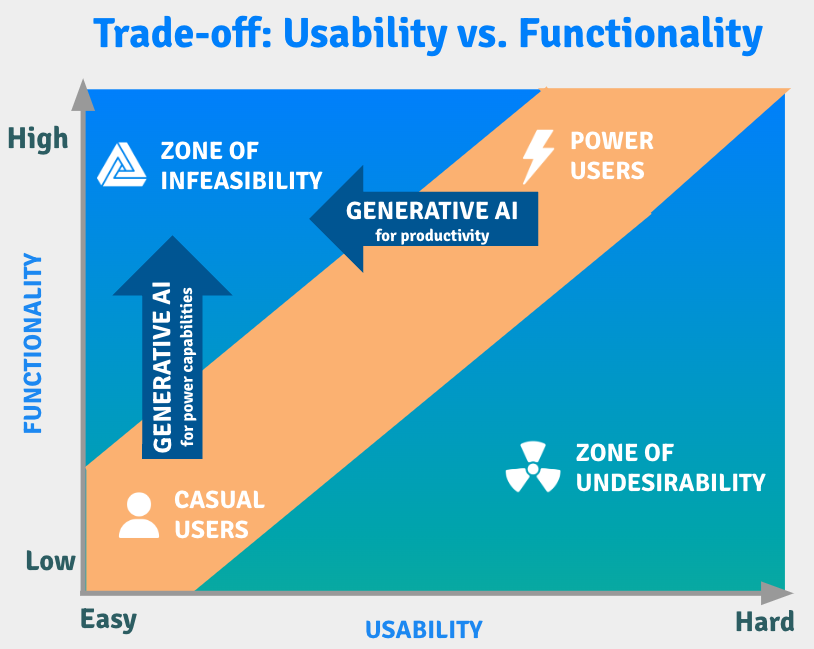
While Generative AI is changing everything from chip design to software development, its most significant impact is actually with regards to UX.
Key Takeaways for Product Managers & Designers
The implications of generative AI unlocking the "Zone of Infeasibility" in product design are profound and multifaceted. This concept refers to the creation of interfaces that are both easy to use and support complex operations, bridging a gap that has traditionally existed in software design. Here are some key implications:
- Democratization of Complex Tasks: Generative AI allows novice users to perform complex operations without needing extensive training or technical knowledge. This democratization can lead to more people engaging in tasks like data analysis, design, or content creation, which were previously accessible only to trained professionals.
- Enhanced Productivity: For power users, generative AI can streamline workflows and increase efficiency. Tasks that previously required intricate knowledge or tedious manual work can be simplified, allowing these users to focus on more strategic or creative aspects of their work.
- Market Expansion: Products that successfully operate in the "Zone of Infeasibility" can capture a larger market share by appealing to both novice and power users. This broad appeal can drive innovation, as companies strive to meet the diverse needs of a wider user base.
- Simplified Onboarding: By making complex functionalities more accessible, there is less need for extensive training. This can reduce onboarding time for new users and lower the barriers to entry for using advanced software tools. For example, one of the biggest hurdles to Product Led Growth (PLG) is the onboarding, which can be drastically simplified through generative AI.
Key Takeaways for Founders & Investors
For the past 40 years, software start-ups have focused on either:
- Creating a new category by building software for a task or process that didn't exist previously
- Being a second mover in an established category but catering to a different class of users, be it novice users or power users.
The problem with the above two approaches is that startups can easily miss product-market fit (PMF). Many startups have died trying to establish a category where there was limited market need (think Google Glass). And many others have died trying to create second mover software for a different set of users (example: Spotify competitor Rdio built for power users).
But what's different now is that the biggest opportunity in software is to break into the Zone of Infeasibility using AI. And unlike software startups in the past, some of the product-market fit is de-risked because it's essentially making an existing process with established market need radically easier.
Acknowledgements
- Lightning icon by Smashicons
- User & Radioactive icons by Freepik
- Impossible icon by Irfansusanto20
- Embedded icons created by juicy_fish – Flaticon
- Muscle icons created by Vitaly Gorbachev – Flaticon
- Transfer icons created by Pixel perfect – Flaticon
- Speed limit icons created by Freepik – Flaticon